vogons - very old games on new systems Last Visit : never :: 2010-9-03 @ 10:58 am : Now
?FAQ sSearch mMemberlist uUsergroups
rRegister pProfile "Messages lLog in
View posts : unanswered
Forum Index :: PC ::
up SCHNEIDER EURO PC II 26 PIN FLOPPY TO STANDARD 34 PIN IDC
Reply with quote SCHNEIDER EURO PC II 26 PIN FLOPPY TO STANDARD 34 PIN IDC :: 2008-7-20 @ 05:34 pm
genocho
Newbie
no avatar
Joined: 2008-07-05
Posts: 6
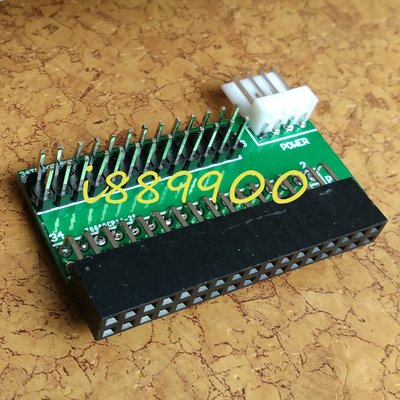
Hi, I´m looking to replace the internal floppy drive of my Schneider Euro PC II, with a "modern" floppy, but when I extract the floppy and look at the data conector see that not is an "standard" drive.

The drive is a SONY MP-F11W-S0, with 26 pin conector and no pins for power supply. I see no jumpers for select drive ds0 or ds1 (a or b), and how is a 720kb floppy drive no jumper for select high or low density.

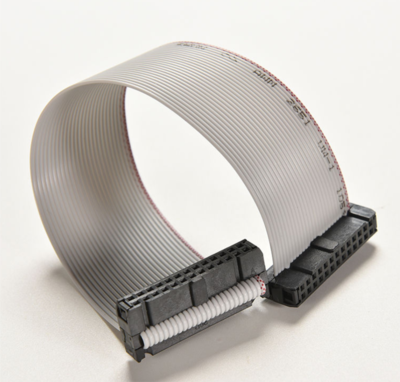
The ribbon 26 pin cable has 3 connectors, one goes to the pcb, the last is ribbon twisted (pins 3,4,5,6,7,8,9) and goes to the internal floppy drive, and in the middle there is a male db-25 for external floppy drive:


26 pin conector ------------- male db 25 --------x----26 pin conector with twisted pins 3,4,5,6,7,8,9

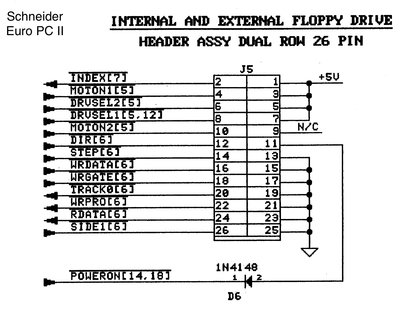
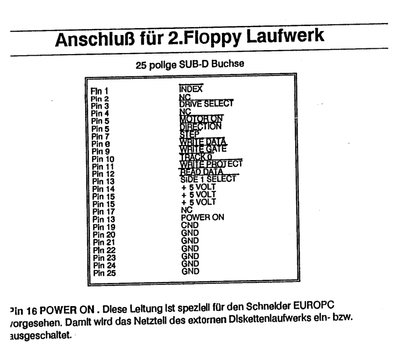
In the manual the pinout look at this:

EXTERNAL EURO PC II FLOPPY PINOUT (SECOND DRIVE):

1. /INDEX
2. NC
3. /DRIVE SELECT
4. NC
5. /MOTOR ON
6. /DIRECTION
7. /STEP
8. /WRITE DATA
9. /WRITE GATE
10. /TRACK 0
11. /WRITE PROTECT
12. /READ DATA
13. /SIDE 1 SELECT
14. +5 VOLT
15. +5 VOLT
16. +5 VOLT
17. +5 VOLT
18. POWER ON
19. NC
20. GND
21. GND
22. GND
23. GND
24. GND
25. GND
26. GND

"/" all means active low:

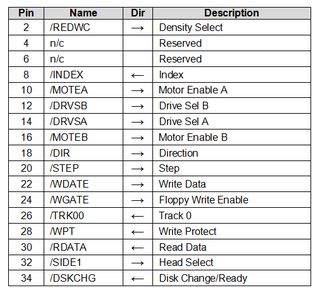
34 PIN IDC FLOPPY DRIVE:

Pin Name Dir Description
2 /REDWC --> Density Select
4 n/c Reserved
6 n/c Reserved
8 /INDEX <-- Index
10 /MOTEA --> Motor Enable A
12 /DRVSB --> Drive Sel B
14 /DRVSA --> Drive Sel A
16 /MOTEB --> Motor Enable B
18 /DIR --> Direction
20 /STEP --> Step
22 /WDATE --> Write Data
24 /WGATE --> Floppy Write Enable
26 /TRK00 <-- Track 0
28 /WPT <-- Write Protect
30 /RDATA <-- Read Data
32 /SIDE1 --> Head Select
34 /DSKCHG --> Disk Change

ALL "/" means active low

PROBLEMS I SEE:

Looking the pinout and comparing with IDC 34 PIN standard I see a lot of things differences:
- PIN 18 in euro pc is for connect or desconnect the supply of the external floppy drive, I think not is neccesary for an normal 34 pin floppy drive.
- PINS 14,15,16,17 are +5v, so I think this pinouts not be used, because 34 pin floppy drive has his own power pins.
- 34 pin idc drive have 4 pins that euro pc floppy don´t 10,12,14,16. Euro pc floppy only have 5 and 6 (motor on & direction) but not says if correspond for a or b drive, so I think can plug 5 and 6 with the corresponding 10,12 for A or 14,16 for B, but I´m not sure if this is the correct way to runs.

I think the rest of the pins are the same, and only have to solder looking at the pinouts tables.

Maybe anyone know how can make run an internal or external idc 34 pin drive
in my euro pc.

Looking in internet I see similar problems in people with korg piano´s and tandy computers, that uses 26 pin floppy drives, but the pinout not is the same at mine.

Thanks in advance and any help is welcome, perhaps anyone make something similar to this, in other machines like amiga, atari, etc,

Waiting for help,

Regards,

Genocho.

Post new topicReply to topic
Offline
Reply with quote Re: SCHNEIDER EURO PC II 26 PIN FLOPPY TO STANDARD 34 PIN IDC :: 2008-7-20 @ 05:54 pm
h-a-l-9000
DOSBox Author
no avatar
Joined: 2005-02-23
Posts: 3178
Your plan sounds good. You might have to look for 12V though.

_________________
1+1=10
Post new topicReply to topic
Hidden
Reply with quote Re: SCHNEIDER EURO PC II 26 PIN FLOPPY TO STANDARD 34 PIN IDC :: 2008-7-21 @ 11:01 pm
genocho
Newbie
no avatar
Joined: 2008-07-05
Posts: 6
Well, finally the idea works.

I solder the common pins of both pinouts, and join all the gnd pins.

I don´t connect pin 34 and pin 2 in idc 34 pin conector, and I use drive sel b and motor enable b.

drive sel a and motor enable a not connected, because I asume this drive may be B unit.

12 volts is not neccesary, the drive runs with gnd and 5v. I use an external power supply, perhaps can use a +5v internal pin, but I don´t want to damage the internals of the euro pc.

I turn on the computer, enter the bios and select driva a 720kb and drive b 720kb, and drive intern for boot.

The pc boots with internal drive and can make a dir in a: and if I put a disk on B I can make a dir on B

If I change the drive boot to external, boots with b and the pc asumes that external floppy is A and internal floppy is B.

All perfect, when I have the exact pinout of the cable I edit this thread with it.

Today is a great day for me, I can connect a "normal" floppy drive to my lovely euro pc II, no more problems if the internal propietary floppy (sony) crashes, now I can replace with a standard one.

Regards, and long life to the XT world,

Genocho.
Post new topicReply to topic
Offline
Reply with quote Re: SCHNEIDER EURO PC II 26 PIN FLOPPY TO STANDARD 34 PIN IDC :: 2010-6-29 @ 10:27 am
goldmundo
.
no avatar
Joined: 2010-06-29
Posts: 1
Hello. VERY GOOD WORK! Did you get the complete map of pinout 26 and 34?

You said: "All perfect, when I have the exact pinout of the cable I edit this thread with it. "


I am very interested. I have a T1000 and a T1200 that need a floppy drive. Thank you very much for your response and work. Is helping me a lot.

a greeting

Wink
Post new topicReply to topic
Offline
page 1 of 1
All times are GMT
Moderate
Quick Reply & Options
You cannot post new topics in this forum
You cannot reply to topics in this forum
You cannot edit your posts in this forum
You cannot delete your posts in this forum
You cannot vote in polls in this forum
You cannot attach files in this forum
You can download files in this forum
Powered by phpBB © 2001-2003 phpBB Group.
vogons and vogons site design and content herein is under a creative commons license 2002-2003 zetafleet.dom.
This site hosts no abandonware. There is no material that is knowingly illegal here.
zetafleet.dom will not be held responsible for users' posts.
This disclaimer is brought to you thanks to the BSA.