vogons - very old games on new systems Last Visit : never :: 2010-8-01 @ 01:48 am : Now
?FAQ sSearch mMemberlist uUsergroups
rRegister pProfile "Messages lLog in
View posts : unanswered
Forum Index :: Deep Thought ::
up patch for WinXP/2000 monitor issues
Reply with quote patch for WinXP/2000 monitor issues :: 2003-5-30 @ 05:10 pm
Simon Hradecky
Newbie
no avatar
Joined: 2003-05-29
Posts: 12
Folks,

find attached my patch program, that can currently patch vga.sys on Windows 2000 SP3, Windows XP and Windows XP SP1, so that Windows no longer traps ports of the graphics board while in full screen mode. This enables to run resolution higher than 640*480 on Nvidia graphics boards and the like (which currently sent the monitor to "sleep").

Simply run the program to install the patch. Should you encounter any problem thereafter, rerun the vgafix.exe to restore the original file.

Should you have any other vga.sys version, that this program doesn't recognize yet, please send that file to me (shradecky@nomissoft.com) together with the information, what Windows and SP standing you have got, for including it with the utility as well.

Servus aus Salzburg
Simon
vgafix.exe (79kB) - Downloaded 15118 Time(s)

Post new topicReply to topic
Offline
Reply with quote :: 2003-5-30 @ 06:35 pm
HunterZ
Moderator
[avatar]
Joined: 2003-01-31
Posts: 4473
Location: Seattle
Is this a memory patcher or a file patcher?
Post new topicReply to topic
Offline
Reply with quote :: 2003-5-30 @ 06:39 pm
Simon Hradecky
Newbie
no avatar
Joined: 2003-05-29
Posts: 12
HunterZ wrote:

Is this a memory patcher or a file patcher?


The patch modifies the file(s) on the harddrive. As Microsoft can't deliver DDKs at the moment, I opted for the faster available way.

Simon
Post new topicReply to topic
Offline
Reply with quote :: 2003-5-30 @ 06:40 pm
[vEX]
Member
[avatar]
Joined: 2002-09-03
Posts: 154
Location: Sweden
HunterZ wrote:

Is this a memory patcher or a file patcher?

Since he wrote this:
Simon Hradecky wrote:

Simply run the program to install the patch. Should you encounter any problem thereafter, rerun the vgafix.exe to restore the original file.

I'd say it's a file patcher.

_________________
Antec P182B | ASUS M3A78-EM (AMD 780G) | AMD Athlon X2 4850e | 4x2048MB PC6400 | WD Caviar Blue 640GB SATA2 | Pioneer DVR-215D | M-Audio DiO 2448 | Altec Lansing CS21 | Dell 2209WA | Arch Linux (64-bit/x86_64)
Post new topicReply to topic
Offline
Reply with quote :: 2003-5-31 @ 01:12 am
Snover
WHAT WHAT IN THE BUTT?!
[avatar]
Joined: 2002-06-30
Posts: 5199
Location: You are likely to be eaten by a grue.
Nice, Simon! Happy

_________________
Colin Snover
Zetafleet Web Development

Believe it or not, we have posting guidelines always.
Post new topicReply to topic
Offline
Reply with quote :: 2003-5-31 @ 03:17 am
HunterZ
Moderator
[avatar]
Joined: 2003-01-31
Posts: 4473
Location: Seattle
I tried it but it doesn't seem to get me any features that I was denied before. Battlespire 1.5 still wouldn't run, with or without NOLFB. Tie Fighter wouldn't detect VESA with or without NOLFB (and wouldn't run period but I don't know if it's related or not). SkyNet still makes the monitor go bananas in hi-res mode, but it did that in pure DOS a few years ago so I'm sure it's an incompatability between SkyNet and nVidia cards.

I can't think of any games I have that use VESA modes higher than 640x480! By the time video cards were fast enough to make that feasable, game developers had already switched to DirectX instead.

Maybe someone will get linear framebuffer support and then I'll be happy Very Happy
Post new topicReply to topic
Offline
Reply with quote :: 2003-5-31 @ 03:32 am
Schadenfreude
Member
no avatar
Joined: 2003-02-12
Posts: 272
Required Reading for Simon re: our musings on LFB support here
------------------------------
http://vogons.zetafleet.com/showthread.php?threadid=474
http://vogons.zetafleet.com/showthread.php?threadid=517
http://vogons.zetafleet.com/showthread.php?threadid=699
http://vogons.zetafleet.com/showthread....eadid=1221
http://vogons.zetafleet.com/showthread....eadid=1428
http://vogons.zetafleet.com/showthread....eadid=1466
http://vogons.zetafleet.com/showthread....eadid=1595

Stiletto says there was also a thread in the secret moderator's forum on it, so maybe Vlad or someone can fill you in on what was said there if it is necessary.

Also - people who might be able to contribute code ideas include users vladr, Glidos, Harekiet, and possibly MajorGrubert. Happy

Interested lurkers might include Andrea Mazzoleni of AdvanceMAME, SMF of MAME DOS, Ken Silverman of the BUILD engine and many other former DOS coders. I'm sure Kendall Bennett of SciTech Software would also be interested.
(and of course Glidos == Paul Gardiner of GliDOS and Harekiet == coder of DOSBox, http://dosbox.sf.net)

I hope you - or someone - decide to throw down and take the LFB project on.

You may want to look at AdvanceCAB, it's kinda interesting -
http://advancemame.sourceforge.net/cab-readme.html
In particular, AdvanceVideo and SVGAWin. But it's not really related.

Interesting former point about vga.sys: MajorGrubert has found posts online using Google that say that source code to vga.sys was supplied with the Windows NT 4.0 DDK, but we don't know if it is included with the Windows 2000 or Windows XP DDKs.
Post new topicReply to topic
Hidden
Reply with quote :: 2003-5-31 @ 03:54 am
Snover
WHAT WHAT IN THE BUTT?!
[avatar]
Joined: 2002-06-30
Posts: 5199
Location: You are likely to be eaten by a grue.
Dammit, I TOLD you people, there IS no secret moderator forum. *shifty eyes*

_________________
Colin Snover
Zetafleet Web Development

Believe it or not, we have posting guidelines always.
Post new topicReply to topic
Offline
Reply with quote Re: patch for WinXP/2000 monitor issues :: 2003-6-01 @ 01:40 am
Nicht Sehr Gut
l33t
[avatar]
Joined: 2002-06-30
Posts: 3630
Quote:
Originally posted by Simon Hradecky [B]so that Windows no longer traps ports of the graphics board while in full screen mode. This enables to run resolution higher than 640*480 on Nvidia graphics boards and the like (which currently sent the monitor to "sleep").
Well, IIRC, 640x480 didn't work either without NOLFB. GF4's were restricted to 640x480 with NOLFB, but GF3's could go all the way up to 1600x1200.

Tried this. Just like previous hex-edit, it "saw" me change the files and I had to tell it to ignore the hacking. No longer got "full-screen errors but, like others, LFB modes still consistently failed. Using VBETEST, I confirmed that I had precisely the same VESA capacity with this hack as without. Only difference was that now I sometimes got a blank screen instead of being "dropped to the desktop". Not a real difference.

Now here's my question. I see that I have this FSVGA.SYS file and that it identifies itself as the "Full Screen Video Driver". Seems like this would need to be hacked in tandem with the VGA.SYS file. Do Win2K people have a FSVGA.SYS file?
Post new topicReply to topic
Offline
Reply with quote :: 2003-6-01 @ 02:39 am
HunterZ
Moderator
[avatar]
Joined: 2003-01-31
Posts: 4473
Location: Seattle
I didn't expect LFB support as a result of this hack, and from what I can see that is the biggest feature that is denied by NT(/2K/XP). The problem is that the LFB memory range is reserved/protected by Windows (or is it?), so it's likely that there is no non-destabilizing way to get access to it. Of course, I could be wrong because I don't know much about Windows programming.
Post new topicReply to topic
Offline
Reply with quote :: 2003-6-01 @ 02:43 am
vladr
Old-timer
[avatar]
Joined: 2002-06-30
Posts: 889
Location: Montréal, QC, CAN
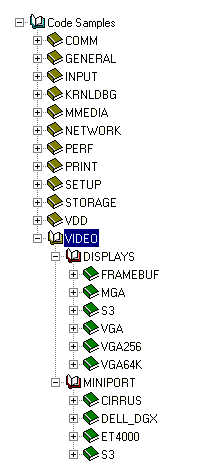
I don't remember where I stuck my copy of the NT4 DDK, but according to the NT4 DDK docs (which I still have handy), the stuff below (waaaaay below, i.e. see attached .gif) is included as sample code. I don't think VGA.SYS is in there (though tons of miniport drivers are).

Also, in Win2k at least there is a VGA.SYS as well as a FSVGA.SYS (full-screen VGA.SYS??) Does anyone know squat about that?

Also, here's some old news from the DDK (for the record).

Quote:

VGA-Compatible Miniport's SvgaHwIoPortXxx
VGA-compatible miniport drivers in x86-based machines replace the system-supplied VGA miniport driver. Therefore, VGA-compatible miniports must have a set of SvgaHwIoPortXxx functions to support full-screen MS-DOS applications as the system-supplied VGA miniport driver does.
The designer of a new VGA-compatible SVGA miniport driver should adapt one of the system-supplied SVGA miniport's SvgaHwIoPortXxx functions to the adapter's features. As already mentioned in VGA-compatible x86 Based Miniports, miniport drivers for other types of adapters in x86-based machines can have a set of SvgaHwIoPortXxx routines and provide the same support at the discretion of the miniport designer or if the miniport cannot be loaded while the system VGA miniport is loaded.

Windowed VDMs in x86-Based Machines
Each MS-DOS application runs as a Windows VDM, which in turn, runs as a Console Manager application in the Win32 protected subsystem.
In Windows NT platforms, a kernel-mode component called the V86 emulator traps I/O instructions issued by MS-DOS applications. As long as such an application runs within a window, its attempts to access video adapter ports are trapped and reflected back to the system-supplied video VDD, which emulates the behavior of the adapter for the application.
In other words, the display driver retains control of the video adapter while a VDM runs in a window.

Full-Screen VDMs in x86-based Machines
For performance reasons, when the user switches an MS-DOS application to full-screen mode in an x86-based machine, the display driver yields control of the adapter. The system VGA or a VGA-compatible miniport driver then hooks out from the V86 emulator all I/O instructions, such as application-issued IN, REP INSB/INSW/INSD, OUT, and REP OUTSB/OUTSW/OUTSD instructions, to the video I/O ports. These hooked I/O operations are forwarded to the VGA-compatible miniport's SvgaHwIoPortXxx functions.
However, for faster performance, a miniport can call VideoPortSetTrappedEmulatorPorts to allow some I/O ports to be accessed directly by the application. The miniport continues to hook other I/O ports with its SvgaHwIoPortXxx to validate the application-issued instruction stream to those ports.
To prevent a full-screen application from issuing a sequence of instructions that might hang the machine, the SvgaHwIoPortXxx functions monitor the application instruction stream to a driver-determined set of adapter registers. A miniport driver must enable direct access only to I/O ports that are completely safe. For example, ports for the sequencer and miscellaneous output registers should always be hooked by the V86 emulator and trapped to the miniport-supplied SvgaHwIoPortXxx functions for validation.
Direct access to I/O ports for the application is determined by the IOPM (named for the x86 I/O permission map) that the VGA-compatible miniport sets by calling VideoPortSetTrappedEmulatorPorts. Note that the miniport can adjust the IOPM by calling this function to have access ranges, describing I/O ports, released for direct access by the application or re-trapped to an SvgaHwIoPortXxx. The current IOPM determines which ports can be accessed directly by the application and which remain hooked by the V86 emulator and trapped to an SvgaHwIoPortXxx function for validation.
By default, all I/O ports set up in such a miniport's emulator access ranges array are trapped to the corresponding SvgaHwIoPortXxx. However, VGA-compatible miniport drivers usually call VideoPortSetTrappedEmulatorPorts on receipt of an IOCTL_VIDEO_ENABLE_VDM request to reset the IOPM for the VDM to allow direct access to some of these I/O ports. Usually, such a driver allows direct access to all video adapter registers except the VGA sequencer registers and the miscellaneous output register, plus any SVGA adapter-specific registers that the driver writer has determined should always be validated by an SvgaHwIoPortXxx.

VGA-Compatible Miniport's HwVidFindAdapter
A VGA-compatible miniport's HwVidFindAdapter function (or registry HwVid..Callback) must set up the following in the VIDEO_PORT_CONFIG_INFO buffer:
· NumEmulatorAccessEntries, indicating the number of entries in the EmulatorAccessEntries array
· EmulatorAccessEntries, pointing to a static array containing the given number of EMULATOR_ACCESS_ENTRY-type elements, each describing a range of I/O ports hooked from the V86 emulator and, by default, forwarded to an SvgaHwIoPortXxx
Each entry includes a starting I/O address, a range length, the size of access to be trapped (UCHAR, USHORT, or ULONG), whether the miniport supports input or output of string data through the I/O port(s), and the miniport-supplied SvgaHwIoPortXxx that actually validates and, possibly, transfers the data. Each SvgaHwIoPortXxx function handles read (IN or REP INSB/INSW/INSD) and/or write (OUT or REP OUTSB/OUTSW/OUTSD) transfers of UCHAR-, USHORT-, or ULONG-sized data.
· EmulatorAccessEntriesContext, a pointer to storage, such as an area in the miniport's device extension, in which the miniport's SvgaHwIoPortXxx can batch a sequence of application-issued instructions that require validation
· VdmPhysicalVideoMemoryAddress and VdmPhysicalVideoMemoryLength, describing a range of video memory that must be mapped into the VDM address space to support BIOS INT10 calls from full-screen MS-DOS applications
The miniport driver can call the VideoPortInt10 function when such an application changes the video mode to one that the miniport driver's adapter can support.
· HardwareStateSize, describing the minimum number of bytes required to store the hardware state for the adapter in response to an IOCTL_VIDEO_SAVE_HARDWARE_STATE request
When the user switches a full-screen MS-DOS application to run in a window, the miniport driver must save the adapter state before the display driver regains control of the video adapter. Note that a VGA-compatible miniport driver also must support the reciprocal IOCTL_VIDEO_RESTORE_HARDWARE_STATE request because the user might switch the windowed application back to full-screen mode.

A VGA-compatible miniport's emulator access entries specify subsets of its access ranges array for the adapter. The emulator access entries can be and usually are all I/O ports in the mapped access ranges array set up by its HwVidFindAdapter function. The access ranges it passes in calls to VideoPortSetTrappedEmulatorPorts, defining the current IOPM and determining the I/O ports that are directly accessible by a full-screen MS-DOS application, specify subsets of the miniport's emulator access entries.

Validating Instructions in SvgaHwIoPortXxx
As already mentioned in VGA-Compatible Miniports HwFindAdapter, the IOPM set for directly accessible I/O ports usually includes all SVGA registers except the sequencer registers and the miscellaneous output register, which the VGA-compatible miniport continues to monitor with its SvgaHwIoPortXxx functions. The sequencer registers control internal chip timing on VGA-compatible video adapters. If a full-screen MS-DOS application touches other adapter registers during a synchronous reset, the machine can hang. Likewise, if the miscellaneous output register is set to select a nonexistent clock, the machine can hang.
VGA-compatible miniport drivers must ensure that full-screen MS-DOS applications do not issue instructions that cause the machine to hang. Each such miniport driver must supply SvgaHwIoPortXxx function that monitor application-issued instructions to the I/O ports for the adapter sequencer registers and miscellaneous output register. Each new VGA-compatible miniport driver for an adapter with special features also must monitor and continue to validate any I/O ports to which an application might send any instruction sequence that could hang the machine.
Whenever an application attempts to access the sequencer clock register, the SvgaHwIoPortXxx must change the IOPM in order to trap all instructions coming in during a synchronous reset. As soon as an application sends an instruction that affects the sequencer or attempts to write to the miscellaneous output register, the SvgaHwIoPortXxx should adjust the IOPM by calling VideoPortSetTrappedEmulatorPorts to disable direct access to all adapter registers.
The miniport-supplied SvgaHwIoPortXxx functions should buffer subsequent IN (or INSB/INSW/INSD) and/or OUT (or OUTSB/OUTSW/OUTSD) instructions in the EmulatorAccessEntriesContext area it set up in the VIDEO_PORT_CONFIG_INFO (see VGA-Compatible Miniports HwFindAdapter ) until the synchronous reset is done, or until the application either restores the miscellaneous output register or resets it to a "safe" clock.
Then, the miniport driver is responsible for checking that the buffered instructions cannot hang the machine. If not, the miniport should process the buffered instructions, usually by calling VideoPortSynchronizeExecution with a driver-supplied HwVidSynchronizeExecutionCallback function. Otherwise, the miniport driver should discard the buffered instructions.

VGA-Compatible Miniport's HwVidStartIO
When the user switches a full-screen MS-DOS application back to running in a window, a VGA-compatible miniport's HwVidStartIO function is sent a VRP with the I/O control code IOCTL_VIDEO_SAVE_HARDWARE_STATE. The miniport must store the state of the adapter in case the user switches the application to full-screen mode again.
Note that the miniport's SvgaHwIoPortXxx might have buffered a sequence of application INs and/or OUTs, as described in Validating Instructions in SvgaHwIoPortXxx, when its HwVidStartIO routine is called to save the adapter state. In these circumstances, the miniport should save the current state, including the buffered instructions, so that the SvgaHwIoPortXxx can resume validation operations exactly where they left off if the user switches the application to full-screen mode again.
When the miniport completes a save operation, the port driver automatically disables the current IOPM for VDMs and the miniport's SvgaHwIoPortXxx functions. The port driver restores the IOPM automatically if the application is switched to full-screen mode again. It also resumes calling the miniport's SvgaHwIoPortXxx, after it calls the miniport's HwVidStartIO routine with the IOCTL_VIDEO_RESTORE_HARDWARE_STATE request.

ddk_code.gif (4.21kB) - Viewed 32079 Time(s)

ddk_code.gif
Post new topicReply to topic
Offline
Reply with quote :: 2003-6-01 @ 03:39 am
Snover
WHAT WHAT IN THE BUTT?!
[avatar]
Joined: 2002-06-30
Posts: 5199
Location: You are likely to be eaten by a grue.
MD5 checksum of the two files. (Original W2KSP3)
drivers.md5 (274bytes) - Downloaded 803 Time(s)


_________________
Colin Snover
Zetafleet Web Development

Believe it or not, we have posting guidelines always.
Post new topicReply to topic
Offline
Reply with quote Re: Re: patch for WinXP/2000 monitor issues :: 2003-6-03 @ 02:28 am
MajorGrubert
Member
[avatar]
Joined: 2002-11-18
Posts: 208
Location: Brazil
Nicht Sehr Gut wrote:


Now here's my question. I see that I have this FSVGA.SYS file and that it identifies itself as the "Full Screen Video Driver". Seems like this would need to be hacked in tandem with the VGA.SYS file. Do Win2K people have a FSVGA.SYS file?

Yes, we have, but closer look shows that it does not seem to be a regular video driver. A miniport driver should call only the functions exported by videoprt.sys, and this is exactly what vga.sys does. Taking a look at fsvga.sys with Dependency Walker (from VC++ 6.0) reveals that it depends directly on the kernel and another DLL called bootvid.dll, identified as "VGA Boot Driver". Maybe it's something loaded only at boot time.

Regards,

_________________
Major Grubert

Athlon 64 3200+/Asus K8V-X/1GB DDR400/GeForce FX 5700/SB Live! 5.1
Post new topicReply to topic
Offline
Reply with quote :: 2003-6-03 @ 09:22 am
Snover
WHAT WHAT IN THE BUTT?!
[avatar]
Joined: 2002-06-30
Posts: 5199
Location: You are likely to be eaten by a grue.
Could be the driver used to show the "Windows 2000 Professional/Windows XP" splash on boot.

_________________
Colin Snover
Zetafleet Web Development

Believe it or not, we have posting guidelines always.
Post new topicReply to topic
Offline
Reply with quote :: 2003-6-03 @ 11:37 am
psz
Newbie
no avatar
Joined: 2003-02-03
Posts: 59
Could be the VGA Mode driver...

_________________
Time is a plaything,
But if it breaks,
You're f*****.
Post new topicReply to topic
Offline
Reply with quote Re: Re: Re: patch for WinXP/2000 monitor issues :: 2003-6-03 @ 04:12 pm
Nicht Sehr Gut
l33t
[avatar]
Joined: 2002-06-30
Posts: 3630
Quote:
Originally posted by MajorGrubert [B]Yes, we have, but closer look shows that it does not seem to be a regular video driver. A miniport driver should call only the functions exported by videoprt.sys, and this is exactly what vga.sys does.
But can you see why I found that to be an odd coincidence? I hacked VGA.SYS and lost all "full-screen" capacity. Not just VGA graphic displays, but anything from the command prompt.
Post new topicReply to topic
Offline
Reply with quote Re: Re: Re: Re: patch for WinXP/2000 monitor issues :: 2003-6-03 @ 04:49 pm
MajorGrubert
Member
[avatar]
Joined: 2002-11-18
Posts: 208
Location: Brazil
Nicht Sehr Gut wrote:

But can you see why I found that to be an odd coincidence? I hacked VGA.SYS and lost all "full-screen" capacity. Not just VGA graphic displays, but anything from the command prompt.

You are right, fsvga.sys looks like a smoking gun. Anyway, I found a tool called Drivers.exe in the Windows 2000 Resource Kit that shows all loaded device drivers. It shows vga.sys loaded all the time, no matter if I'm running a full screen DOS program or not, but it does not show fsvga.sys. I believe Snover is right and it is used only to display the splash screen at boot time.

Regards,

_________________
Major Grubert

Athlon 64 3200+/Asus K8V-X/1GB DDR400/GeForce FX 5700/SB Live! 5.1
Post new topicReply to topic
Offline
Reply with quote Re: Re: Re: Re: patch for WinXP/2000 monitor issues :: 2003-6-03 @ 09:42 pm
dvwjr
Member
no avatar
Joined: 2002-11-23
Posts: 328
Quote:
Originally posted by Nicht Sehr Gut:

But can you see why I found that to be an odd coincidence? I hacked VGA.SYS and lost all "full-screen" capacity. Not just VGA graphic displays, but anything from the command prompt.


This parallels my experience with the "modified" VGA.SYS file on a Matrox G450 PCI using the Matrox PowerDesk for Windows 2000/XP Revision 5.86.032 (latest) drivers. I used the program VGATEST.EXE to see what my Matrox G450 could do under DOS, XP(SP1), and finally XP(SP1) with the modified VGA.SYS driver.

I have attached the VGATEST.EXE program that I used to gather the data below. It will test all of the below modes IF you use the VGATEST 0 command line option only. The other modes with attempt to go to SVGA modes directly will fail to even start testing. Below shows the video mode screens that are displayed after each ENTER keypress.

With the modified VGA.SYS driver, the Matrox G450 PCI looses the VESA modes 100h and 101h that it actually had available, and only gained the VESA mode 107h. Maybe better on NVidia video adapters, I'll have to check on that card later.

Code:

VGATEST.EXE 0
First performs Video Memory Test, then goes to following
video mode screens, use ENTER to move to next screen.

                 Matrox G450 PCI
                  (BIOS 2.0b36)

  Mode      Dos 6.22     WinXP(SP1)     VGA.SYS (hacked)
********************************************************
   0h         Works        Works         Works
   1h         Works        Works         Works
   2h         Works        Works         Works
   2h scroll  Works        Works         Works
   3h         Works        Works         Works
   3h scroll  Works        Works         Works
   3h extend  Works        Works         Works
   7h         Works        Works         Works
   7h scroll  Works        Works         Works
   4h         Works        Works         Works
   5h         Works        Works         Works
   6h         Works        Works         Works
   Dh         Works        Works         Works
   Eh         Works        Works         Works
   Fh         Works        Works         Works
  10h         Works        Works         Works
  11h         Works        Works         Works
  12h         Works        Works         Works
  13h         Works        Works         Works
 100h         Works        Works         FAILS
 101h         Works        Works         Fails
 103h         Works        FAILS         Fails
 105h         Works        Fails         Fails
 107h         Works        Fails         WORKS
 110h         Works        Fails         Fails
 111h         Works        Fails         Fails
 113h         Works        Fails         Fails
 114h         Works        Fails         Fails
 116h         Works        Fails         Fails
 117h         Works        Fails         Fails
 119h         Works        Fails         Fails
 11Ah         Works        Fails         Fails
 112h         Works        Fails         Fails
 115h         Works        Fails         Fails
 118h         Works        Fails         Fails
 11Bh         Works        Fails         Fails
 102h         Works        Fails         Fails
 ???h         FAILS        Fails         Fails
 ???h         Fails        Fails         Fails
 ???h         Fails        Fails         Fails
 ???h         Fails        Fails         Fails
 ???h         Fails        Fails         Fails
 ???h         Fails        Fails         Fails
 ???h         Fails        Fails         Fails
 ???h         Fails        Fails         Fails
Test Finished


dvwjr
vgatest.exe (79.54000000000001kB) - Downloaded 1497 Time(s)

Post new topicReply to topic
Offline
Reply with quote :: 2003-6-04 @ 06:35 am
DosFreak
Freaky Ram Thing
[avatar]
Joined: 2002-06-30
Posts: 7362
Location: Your Head
Hmm, Everyone that plans on testing list your:

Video Card
OS (and SP Level)
Motherboard


Since I'm visiting my parent's I currently only have these video cards to test with:

ATI 3D-Rage LT Pro (Integrated...AGP 1x?)
Geforce 4 MX 420 (PCI)
Geforce FX 5200 (PCI)

Using the above patch and the video testing utility posted above my post.

_________________
Game Acronym List
DosBox CVS Builds
DosBox Wish List
DosBox FAQ
PC Game Compatibility List
DOSBox Video Tutorial
Quote:
I am the Milkman. My milk is delicious
Post new topicReply to topic
Offline
Reply with quote :: 2003-6-04 @ 01:07 pm
MajorGrubert
Member
[avatar]
Joined: 2002-11-18
Posts: 208
Location: Brazil
I can't wait to test, but my primary HD has gone fubar last night. Vga.sys is gone, along with two Windows installations and my latest saved games. Maybe I'll have something back in the weekend to try again Sad

_________________
Major Grubert

Athlon 64 3200+/Asus K8V-X/1GB DDR400/GeForce FX 5700/SB Live! 5.1
Post new topicReply to topic
Offline
page 1 of 3
Goto page 1, 2, 3  Next
All times are GMT
Moderate
Quick Reply & Options
You cannot post new topics in this forum
You cannot reply to topics in this forum
You cannot edit your posts in this forum
You cannot delete your posts in this forum
You cannot vote in polls in this forum
You cannot attach files in this forum
You can download files in this forum
Powered by phpBB © 2001-2003 phpBB Group.
vogons and vogons site design and content herein is under a creative commons license 2002-2003 zetafleet.dom.
This site hosts no abandonware. There is no material that is knowingly illegal here.
zetafleet.dom will not be held responsible for users' posts.
This disclaimer is brought to you thanks to the BSA.